 Essential Mac Apps
Maccy
Lightweight clipboard manager for Mac.
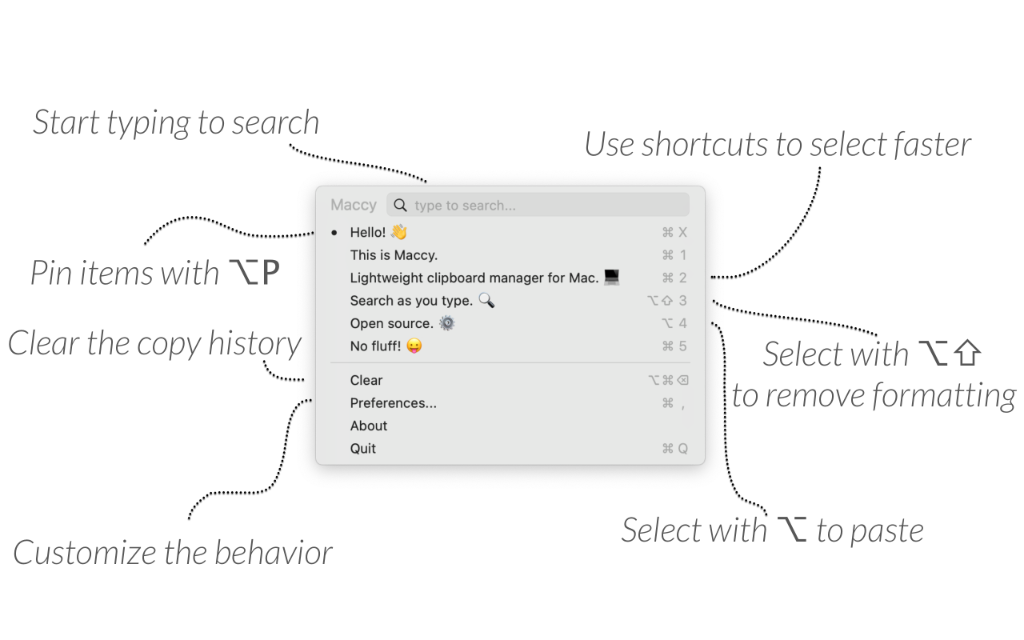
Maccy is a clipboard manager for macOS. It keeps what you copy and lets you search that history from the keyboard.
Open it with Shift-Command-C, or from the menu bar icon. Type to search, then press Return to copy an item. Option-Return pastes it. Option-Shift-Return pastes without formatting. Option-P pins an item to the top. Clear removes unpinned items. Hold Option and choose Clear to remove pinned items too.
History stays on your Mac. If a password manager clears a copied password from the clipboard, Maccy removes it as well. Extra pasteboard types can be ignored in Preferences.
Maccy is open source under the MIT license. The download from maccy.app and GitHub is free. The Mac App Store listing is sold to support development. It requires macOS 14 or later. You can also install it with brew install maccy.
Frequently asked questions
Is Maccy free?
Yes, from maccy.app and from GitHub. The Mac App Store version costs $9.99. That listing says the App Store version is sold to support development. The source is MIT licensed.
Why does paste not happen when I select an item?
Turn on Paste automatically in Preferences, and add Maccy under System Settings, Privacy and Security, Accessibility.
How do I pin or clear history?
Option-P pins the selected item. Clear removes unpinned items. Hold Option while choosing Clear to remove pinned items too.
How do I paste without formatting?
Press Option-Shift-Return, or Option-Shift-click the item.
Does Maccy store my clipboard online?
The site says everything is stored on your computer. Password-manager copies that are removed from the clipboard are removed from Maccy too.
How do I install it?
Download it from maccy.app, or run brew install maccy. The same app is also on the Mac App Store. maccy.app is the only official website.
Gallery
Related apps

Alcove
Dynamic Island for your Mac.
UtilitiesPaidAdded Oct 9, 2026
Compresto
Video, image, and PDF compression for macOS.
UtilitiesPaidAdded Oct 9, 2026Firefox
Web browser from Mozilla.
UtilitiesFreeAdded Oct 9, 2025
Klack
Satisfying sound with every keystroke.
UtilitiesPaidAdded Oct 9, 2026
LookAway
Smart break reminder for your Mac.
UtilitiesPaidAdded Oct 9, 2026
Mole
Native Mac utility for cleanup, software, and status.
UtilitiesPaidAdded Oct 9, 2026
Alternatives
No alternatives listed yet.