 Essential Mac Apps
Astro
Your app deserves more visibility
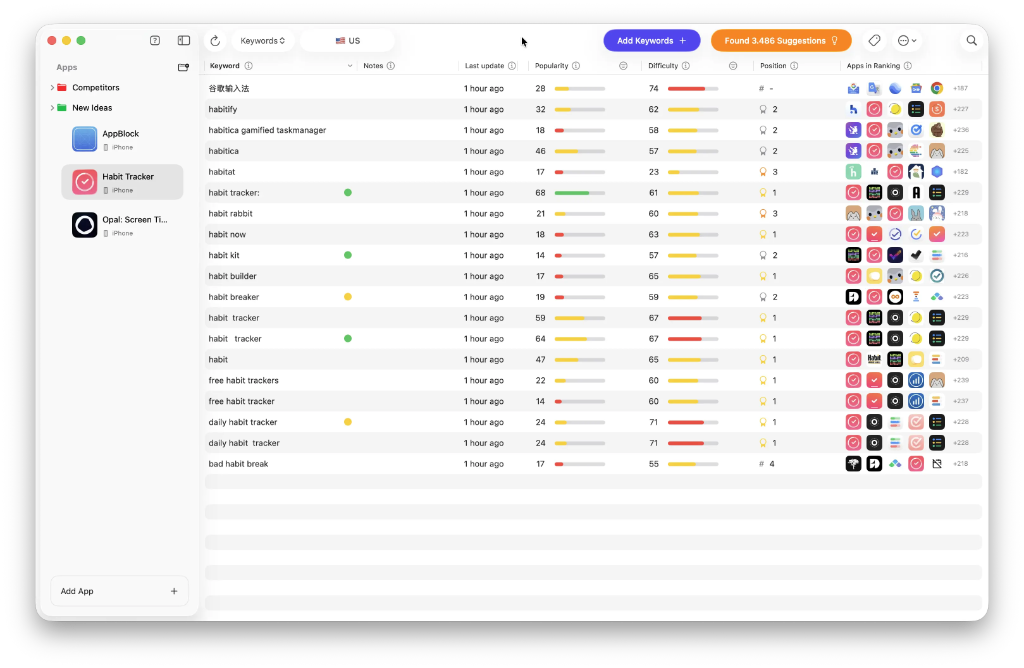
Astro is a Mac app for App Store Optimization from 28 bit S.R.L. It finds keywords people search on the Apple App Store and tracks how an app ranks for them.
Search by keyword, developer name, or an App Store link. You can look across iOS, iPadOS, macOS, and visionOS, and switch among 91 store regions. Astro refreshes keyword rankings each day and keeps a history of position changes.
Keyword popularity comes from Apple Search Ads. Astro also shows how hard it is to place in the top 10 for a keyword. You can load the keywords a competitor ranks for, import or export keywords as CSV, and hover a word to see an English translation through DeepL. A built-in MCP server, still in beta, can connect that data to Cursor, Visual Studio Code, or Claude Code on the same Mac.
The paid plan is $108 per year, shown on tryastro.app as $9 per month and billed annually, in USD. It tracks apps and keywords without a cap. A free demo is available from the same site and has limited features. One license covers one Mac. You can ask for a refund within 14 days by emailing hello@tryastro.app.
Frequently asked questions
What is Astro?
Astro is a native Mac app for App Store keyword research and rank tracking. It requires macOS 14 or later and is made by 28 bit S.R.L.
How much does Astro cost?
tryastro.app lists the plan at $9 per month, billed annually as $108. Prices are in USD, and taxes may apply.
Is there a free demo?
Yes. You can download the demo from tryastro.app without an account. The demo has limited features. Popularity and difficulty numbers are part of the paid plan.
Which platforms and countries does it cover?
Astro searches the Apple App Store for iOS, iPadOS, macOS, and visionOS. The docs list 91 regions where Apple Ads is available.
Can I research competitor keywords?
Yes. Open Suggestions, paste a competitor App Store URL, and Astro lists the keywords that app ranks for in the selected store.
Does Astro track ratings and reviews?
Yes. It checks App Store regions for new reviews so you can see where an app's ratings have changed.
How do refunds and subscriptions work?
Email hello@tryastro.app within 14 days of starting a subscription to request a refund. To change or cancel the plan, sign in to Lemon Squeezy with the email used at checkout.
Where do I download Astro?
The app is a direct download from tryastro.app for macOS 14 or later.
Gallery
Related apps

Codex
Coding agent from OpenAI.
Developer ToolsSubscriptionAdded Oct 9, 2026
Cursor
Code editor with an AI agent.
Developer ToolsFreemiumAdded Oct 9, 2026
iTerm2
Free terminal emulator for Mac.
Developer ToolsFreeAdded Oct 9, 2025
Raycast
Extendable keyboard launcher for Mac.
Developer ToolsFreemiumAdded Oct 9, 2025Visual Studio Code
Code editor from Microsoft.
Developer ToolsFreeAdded Oct 9, 2025Zed
Code editor for Mac.
Developer ToolsFreeAdded Oct 9, 2025
Alternatives
No alternatives listed yet.