 Essential Mac Apps
Figma
Design and prototype on a shared canvas.
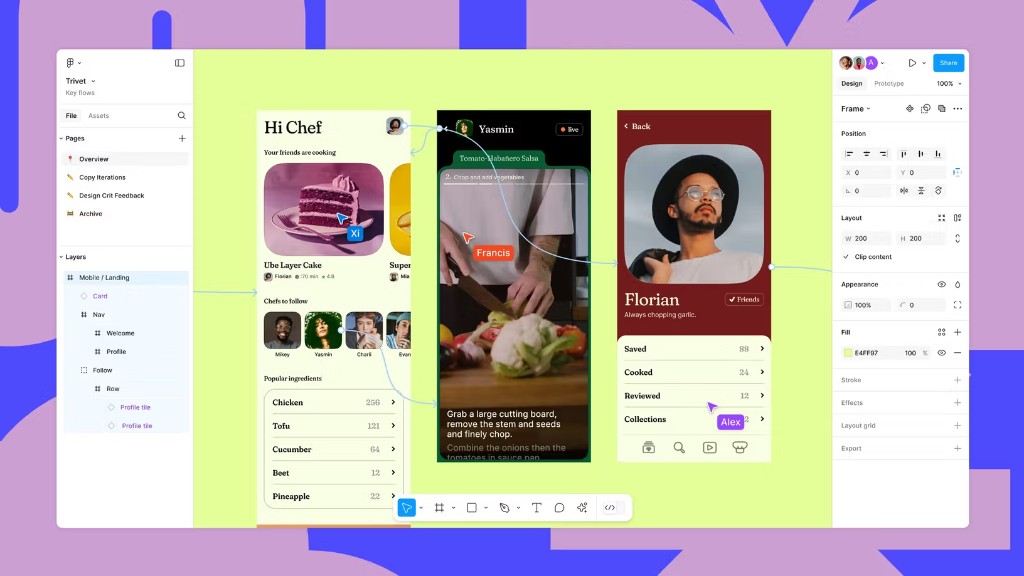
Figma is a design app for Mac. You lay out interfaces on a canvas with layers, components, auto layout, and prototypes, and other people can work in the same file.
The desktop app is a download for macOS, and it includes the font installer. Figma also runs in the browser and has apps for iPhone and iPad. FigJam is the whiteboard in the same account. Dev Mode is the view for inspecting a design and handing it to engineering.
The Starter plan is free. It includes unlimited drafts, UI kits and templates, and a limited number of AI credits. Professional, Organization, and Enterprise are paid plans, with separate seats for design, development, and collaboration.
On a paid plan, other people can view and comment without an extra seat. Plugins, UI kits, widgets, and templates are available from the Figma community.
Frequently asked questions
Is Figma free?
The Starter plan is free. It includes unlimited drafts, UI kits and templates, and 150 AI credits a day, up to 500 a month. Professional and higher plans are paid.
What does a paid plan cost?
On figma.com, a Professional full seat is $16 a month. A Dev seat is $12 a month and a Collab seat is $3 a month. Organization and Enterprise are billed annually. Prices are in US dollars.
Do viewers need their own seat?
On a paid plan, other people can view and comment on files without an extra seat.
Is there a Mac app?
Yes. Download the desktop app for macOS from figma.com. It includes the font installer. You can also use Figma in the browser, and there are apps for iPhone and iPad.
What is FigJam?
FigJam is the online whiteboard in the same account. Figma Design is the canvas for interfaces and prototypes. Dev Mode is for inspecting a design and handing it off.
Can I extend Figma?
Yes. The community offers plugins, UI kits, widgets, and templates. You install them from inside Figma.
Gallery
Related apps
Alternatives
No alternatives listed yet.